
IP Addressing 1
Topology
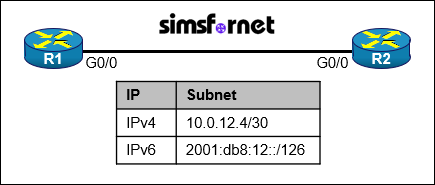
Tasks:
Task 1:
- Configure R1 with the first usable host IP address in the IPv4 network.
- Configure R2 with the last usable host IP address in the IPv4 network.
- Verify connectivity using ping.
Task 2:
- Do not assign the subnet router anycast address to either router.
- Configure R1 with the first usable host IP address in the IPv6 network.
- Configure R2 with the last usable host IP address in the IPv6 network.
- Verify connectivity using ping
Solution:
Task #1: Assign IPv4 addresses for the /30 network between R1 and R2
With a /30 mask on 10.0.12.4/30, the usable host addresses are 10.0.12.5 and 10.0.12.6 and the broadcast address is 10.0.12.7. We assign the first usable IP (.5) to R1's G0/0 and the last usable IP (.6) to R2's G0/0, then verify connectivity.
On R1:
R1# configure terminal
R1(config)# interface g0/0
R1(config-if)# ip address 10.0.12.5 255.255.255.252
R1(config-if)# no shutdown
R1(config-if)# exit
ip address 10.0.12.5 255.255.255.252: Sets g0/0 to the first usable address in the 10.0.12.4/30 subnet.
no shutdown: Enables the interface.
On R2:
R2# configure terminal
R2(config)# interface g0/0
R2(config-if)# ip address 10.0.12.6 255.255.255.252
R2(config-if)# no shutdown
ip address 10.0.12.6 255.255.255.252: Sets g0/0 to the last usable address in the 10.0.12.4/30 subnet.
Verification:
R1# ping 10.0.12.6
Type escape sequence to abort.
Sending 5, 100-byte ICMP Echos to 10.0.12.6, timeout is 2 seconds:
!!!!!
Success rate is 100 percent (5/5), round-trip min/avg/max = 1/1/1 ms
Task #2: Assign IPv6 addresses for the /126 network without using the anycast address
A /126 IPv6 subnet gives 4 total addresses. The first address (2001:db8:12::) is reserved for the subnet router anycast (similar to the "network address" in IPv4).
The remaining usable addresses are:
- 2001:db8:12::1
- 2001:db8:12::2
- 2001:db8:12::3 (IPv6 has no broadcast address, so this is usable)
R1 gets: 2001:db8:12::1/126 (first usable address)
R2 gets: 2001:db8:12::3/126 (last usable address)
On R1:
R1# configure terminal
R1(config)# interface g0/0
R1(config-if)# ipv6 address 2001:db8:12::1/126
R1(config-if)# exit
ipv6 address 2001:db8:12::1/126: Sets g0/0 to the first usable IPv6 address in the /126 subnet.
On R2:
R2(config-if)# ipv6 address 2001:db8:12::3/126
R2(config-if)# exit
ipv6 address 2001:db8:12::3/126: Sets g0/0 to the last usable IPv6 address in the /126 subnet.
Verification:
R1# ping 2001:db8:12::3
Type escape sequence to abort.
Sending 5, 100-byte ICMP Echos to 2001:db8:12::3, timeout is 2 seconds:
.!!!!
Success rate is 80 percent (4/5), round-trip min/avg/max = 4/6/8 ms
Save all configurations to NVRAM:
R1# write
R2# write
Packet Tracer File
Clicking this button will begin the download of a ZIP file. Inside the ZIP file, you'll find a Packet Tracer Activity (.pka) file, which will automatically track your progress as you configure the network.